Home Page › Forums › General Discussion › X Game flash firmware error
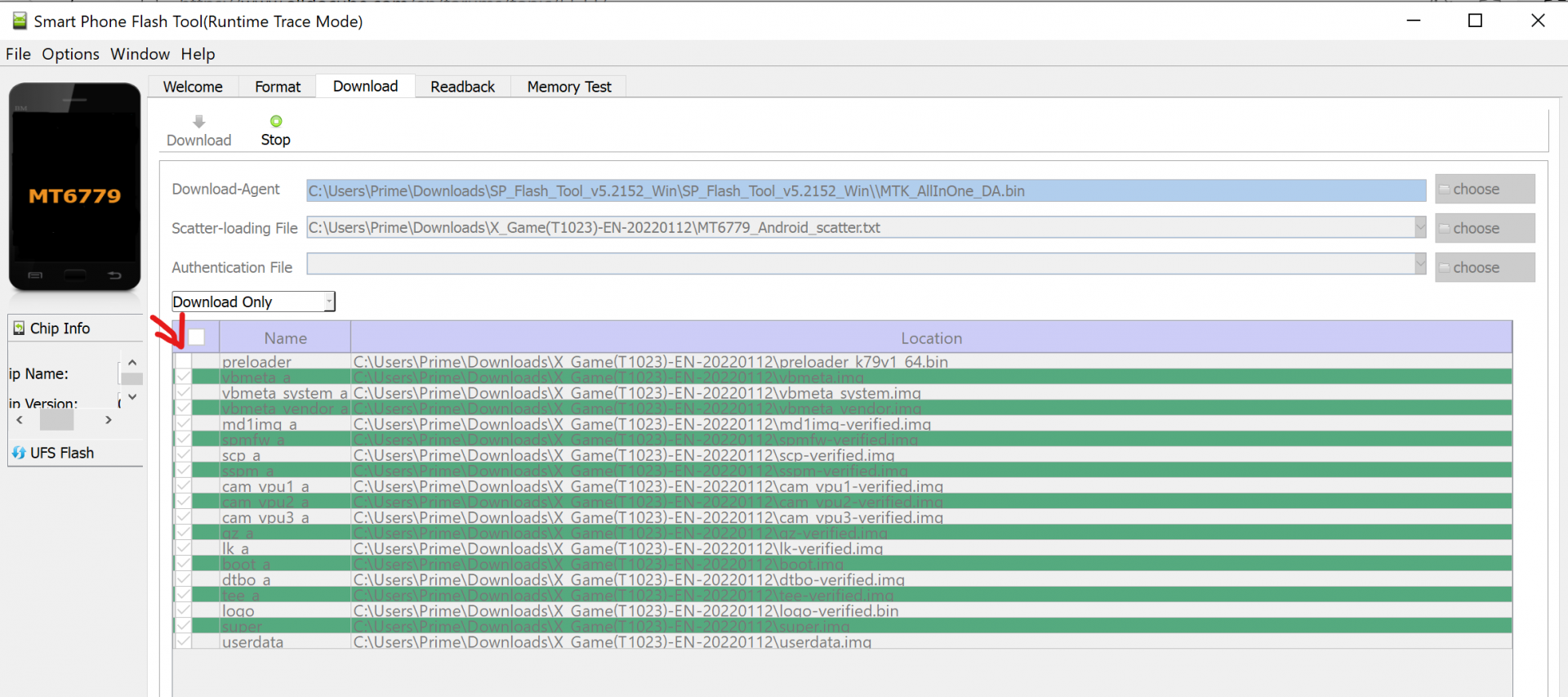
I have downloaded the firmware and tried to flash using SP Flash Tool, but an error message 0xC0050001 (Status_Device_Ctrl_Exception) pops out and the flashing stop. Anyone know whats the reason and how to solve this issue?
Try turning off an antivirus and firewall, for sure a new USB cable, install MTK_USB_ALL_V1.0.8 and SP_FLASH_TOOL_V5.2152_WIN and I would still download the install again. Otherwise, I do not think of anything.
MTK_USB_ALL_V1.0.8 is the same application with Mediatek_Driver_Auto_Installer_V1.1352 ?
I follow the instructions but too bad, still failed to flash the firmware.
https://mega.nz/file/VUlGGJqJ#ReTF4oxCG1hPk3b4B-B7Lk1UWKSqhLxroXa_L1keA5c
Try this, including the exe version of the installation driver, and the inf driver (can manually right-click in the Windows system device manager to browse and install).
In addition, if the tablet can still be turned on, you can try to connect it to the computer in the power-on state, and then shut down or restart it to see if the port can be correctly recognized by spflashtool when the tablet is shut down or restarted.
I wonder whether it is because the “preloader” box was unchecked during the installation that cause the error. Any master can help on this?

For your chance to win our tablet, we would like to invite you to subscribe and become our member. As a member you will receive the latest news updates, product announcements, promotions and giveaways from ALLDOCUBE. Subscribe now so that you dont miss out!